Secure Travel Photos Without Cloud Backup
The scenario is all too familiar: you’re halfway through an incredible trip, your camera roll is bursting with breathtaking landscapes and candid moments, and a sudden wave of panic washes over you. What if your phone gets lost? What if your camera is stolen? And, crucially, what if you don’t trust your precious, unrepeatable memories to an unknown cloud server in a faraway data center? For many of us, the convenience of automatic cloud backups is overshadowed by privacy concerns, data limits, or simply the unreliable internet connections often encountered in remote, adventurous locations.
I’ve been there. On a backpacking trip through Southeast Asia years ago, my phone, containing nearly a week’s worth of vibrant market scenes and serene temple photos, decided to take an unscheduled swim in a river. No cloud backup enabled. No physical backup done that day. The gut-wrenching realization that those moments were just… gone… was a lesson I vowed never to repeat. But my solution wasn’t to immediately embrace a cloud-first strategy. Instead, I developed a robust, on-the-ground system that gives me complete control over my data, regardless of Wi-Fi availability or my privacy comfort level with third-party servers. What changed everything for me was shifting my mindset from reactive ‘if it happens, I’ll deal with it’ to proactive ‘how can I guarantee I have multiple copies of my data, always?’
Key Takeaways
- Carry at least two high-capacity external drives and rotate your daily backups between them to create redundant local copies.
- Utilize a portable card reader and a compact travel laptop or tablet for immediate, reliable transfers of photos from your camera’s memory cards.
- Implement a disciplined ‘shoot-transfer-verify’ routine at the end of each day to ensure every memory is safely stored.
- Invest in rugged, shockproof, and water-resistant storage devices to withstand the unpredictable nature of travel.
Double Down on Physical Drives
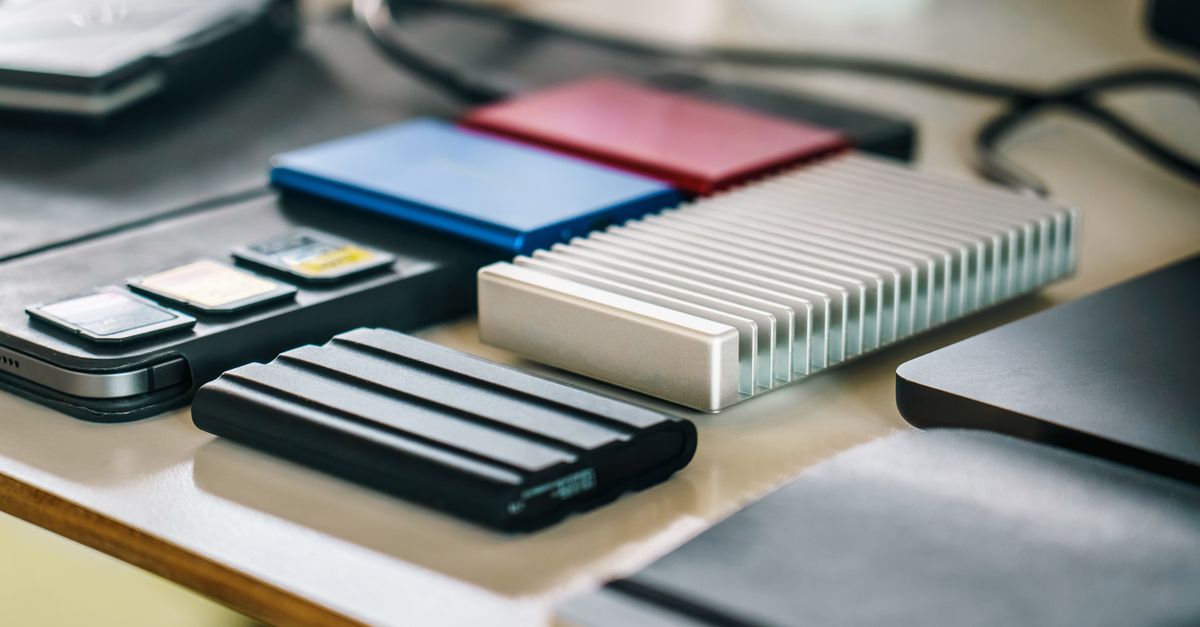
The mistake I see most often is people relying on a single external hard drive. It’s like putting all your eggs in one basket, then traveling with that basket on a bumpy road. In my experience, redundancy is not just a good idea; it’s non-negotiable when you’re actively creating irreplaceable content. My system involves carrying at least two high-capacity portable SSDs (Solid State Drives). I prefer SSDs over traditional HDDs for their durability, speed, and compact size – essential qualities when you’re constantly on the move.
Here’s how I implement this:
- Daily Rotation: Each day, after I finish shooting, I back up my memory cards to one of the external SSDs. The next day, I use the other SSD. This way, if one drive fails, gets lost, or is stolen, I only ever lose, at most, one day’s worth of photos. When I say ‘high-capacity,’ I’m talking about 2TB or 4TB drives. This might seem like overkill for a casual traveler, but if you’re shooting high-resolution photos or video, cards fill up fast, and you want ample space to avoid constantly juggling drives.
- Separate Storage: Crucially, these two drives are never stored in the same bag. One might be in my daypack, the other in my main luggage back at the hotel, or one might even be on my person while the other is securely locked away. The goal is to ensure that a single incident – a lost bag, a theft, water damage – doesn’t wipe out both copies.
- Physical Ruggedness: I specifically purchase SSDs that are marketed as rugged, shockproof, and water-resistant. Brands like SanDisk Extreme Portable SSD or LaCie Rugged series are excellent choices. They cost a bit more, but the peace of mind knowing your drives can withstand an accidental drop or a splash of rain is invaluable.
This system effectively creates two entirely separate, up-to-date physical backups of my work. The initial cost might be higher than a cloud subscription, but it’s a one-time investment that puts me in full control of my data, regardless of network availability or monthly fees.
Leverage a Compact Travel Hub
Transferring hundreds of gigabytes of data from multiple memory cards to external drives daily requires efficient tools. Most travelers assume their laptop’s built-in card reader is sufficient, but that’s a common oversight. Travel environments are often dirty, dusty, or humid, and constantly inserting and removing memory cards from a laptop’s delicate internal reader can lead to problems. What changed everything for me was investing in a robust, multi-port USB-C hub with a dedicated, high-speed card reader slot.
My setup includes:
- A dedicated USB-C hub: I use a hub that includes at least one SD card slot, one microSD card slot (if my drone or action camera uses them), and multiple USB-A and USB-C ports. This allows me to connect all my camera’s memory cards and my two external SSDs simultaneously.
- Portable Travel Laptop or Tablet: I prefer a lightweight laptop (like a MacBook Air or a high-performance Chromebook) or a powerful tablet (like an iPad Pro with a USB-C port) for the actual data transfer and verification. These devices have enough processing power and battery life to handle large file transfers efficiently.
- Verification Software: While simply dragging and dropping files works, I use a file verification tool (like
rsyncon macOS/Linux or TeraCopy on Windows) to ensure data integrity during transfer. This adds a crucial layer of trust, verifying that every byte copied matches the original, preventing corrupted files – a silent killer of travel memories.
This approach ensures that I’m not fumbling with tiny adapters or relying on potentially slow, unreliable connections. It streamlines the backup process, making it less of a chore and more of a quick, integrated step in my daily routine.
Implement a Daily ‘Shoot-Transfer-Verify’ Routine
The best backup strategy is useless if you don’t execute it consistently. The mistake I made early on was putting off backups until I had ‘enough’ photos or ‘enough’ time. That was how my river incident happened. What changed everything for me was making the end-of-day backup a ritual, an unskippable part of my travel routine, no matter how tired I was.
My daily shoot-transfer-verify routine looks like this:
- Shoot: Enjoy the day, capture every moment without worrying about storage, as I know I have a robust system in place.
- Evening Wind-Down: As I settle in for the night, whether in a hotel, hostel, or tent, the first thing I do is pull out my memory cards and connect them to my travel hub. I then connect the designated external SSD for that day’s backup (remember the rotation!).
- Transfer: I initiate the file transfer, always copying (not moving) the files from my memory cards to the external SSD. This ensures the original data remains on the card until I’ve completed a full verification.
- Verify: Once the transfer is complete, I use my verification software to compare the copied files with the originals. This step is critical; it’s the definitive check that your data made it across intact. Only after successful verification do I consider the backup ‘done’ for that day.
- Reformat Cards (Optional, but Recommended): After verification and only then, I will reformat the memory cards in my camera. This prevents accidental overwrites and ensures the cards are fresh for the next day’s shooting.
This systematic approach takes about 15-30 minutes, depending on the volume of photos, but it’s a small investment for indelible peace of mind. It’s a habit now, as ingrained as brushing my teeth, and it has saved me from potential data loss countless times.
Plan for Worst-Case Scenarios Beyond Theft
Most people think of backup in terms of theft or loss, but what about environmental factors? Travel exposes your gear to dust, humidity, extreme temperatures, and accidental spills. In my experience, ignoring these realities is another common mistake. What changed everything for me was proactively anticipating these challenges and choosing gear that could withstand them.
Beyond rugged external SSDs, here’s how I prepare:
- Waterproof Dry Bags/Cases: All my critical electronics – external drives, portable laptop, and camera gear – go into waterproof dry bags when I’m traveling between locations or when there’s any chance of rain, splashes, or high humidity. Even in a hotel room, a dry bag provides an extra layer of protection against accidental spills.
- Silica Gel Packets: I always carry small packets of silica gel. I toss them into my camera bag and my dry bags, especially in humid climates, to absorb moisture and protect against condensation damage, which can silently degrade electronics and storage media over time. What seems like a minor detail is actually a significant preventative measure.
- Power Redundancy: A dead battery means no backup. I carry at least two high-capacity power banks and ensure they are always charged. This allows me to charge my laptop/tablet for transfers even when traditional power outlets are unavailable or unreliable.
- Secure Storage (On Person): When I’m in transit or out exploring, my primary external SSD (the one containing the most recent backup) is often on my person, in a secure, hidden pocket or a cross-body bag. My camera, phone, and secondary SSD might be in a separate, locked bag. This ensures that even if one bag is lost or stolen, I still have one crucial layer of my data safe.
By planning for these worst-case scenarios, I’m not just protecting against theft but against the myriad unpredictable elements of travel that can silently destroy precious memories.
Frequently Asked Questions
How often should I back up my travel photos when not using the cloud?
I recommend backing up your photos daily, ideally at the end of each day’s shooting. This minimizes potential data loss if anything happens to your primary memory cards or a single backup drive. Establishing a routine makes it much easier to stick to.
What capacity external drives do you recommend for non-cloud travel backups?
For most travelers shooting high-resolution photos or video, I recommend 2TB to 4TB portable SSDs. SSDs are faster and more durable than traditional HDDs. Always carry at least two, and consider higher capacities if you plan extended trips or shoot a lot of video.
Is it safe to reformat memory cards after backing up photos?
Yes, it is generally safe and recommended to reformat your memory cards in your camera after you have successfully transferred and verified your backups to at least two separate external drives. Reformatting in-camera ensures optimal card performance and helps prevent file corruption.
What if I don’t want to carry a laptop for backups?
If you prefer not to carry a laptop, a high-powered tablet (like an iPad Pro or a Samsung Galaxy Tab S series) with a USB-C hub can serve as an effective alternative. Ensure the tablet has sufficient internal storage for temporary transfers, and the hub supports your memory card types and external drives. Some portable media hubs also allow direct card-to-drive transfer without an intermediate device.
How can I protect my physical drives from damage during travel?
Invest in rugged, shockproof, and water-resistant external SSDs. Store them in separate, padded compartments or cases within your luggage. Use waterproof dry bags for added protection against moisture and accidental spills, especially in humid environments. Carrying silica gel packets in your gear bags can also help absorb excess humidity.
Safeguarding your travel photos without relying on cloud services is entirely achievable with a disciplined approach and the right gear. By prioritizing redundancy, using efficient transfer tools, sticking to a daily backup routine, and anticipating environmental challenges, you can travel with confidence, knowing your irreplaceable memories are secure, under your control, and always accessible.
Written by Amelia Vance
Cultural immersion and visual storytelling
A photojournalist by trade, Amelia captures the soul of a destination through her lens and evocative prose.
You Might Also Like
How to Secure Your Bluetooth Travel Headphones from Eavesdropping in Public
Traveling with Bluetooth headphones? Learn practical steps to protect your audio privacy from eavesdropping in public spaces and on shared networks.